

Clicking a dashboard tile on the home page opens the report behind it, filtered to the mode of the current tab. Hovering over a tile shows the name of the report it opens.
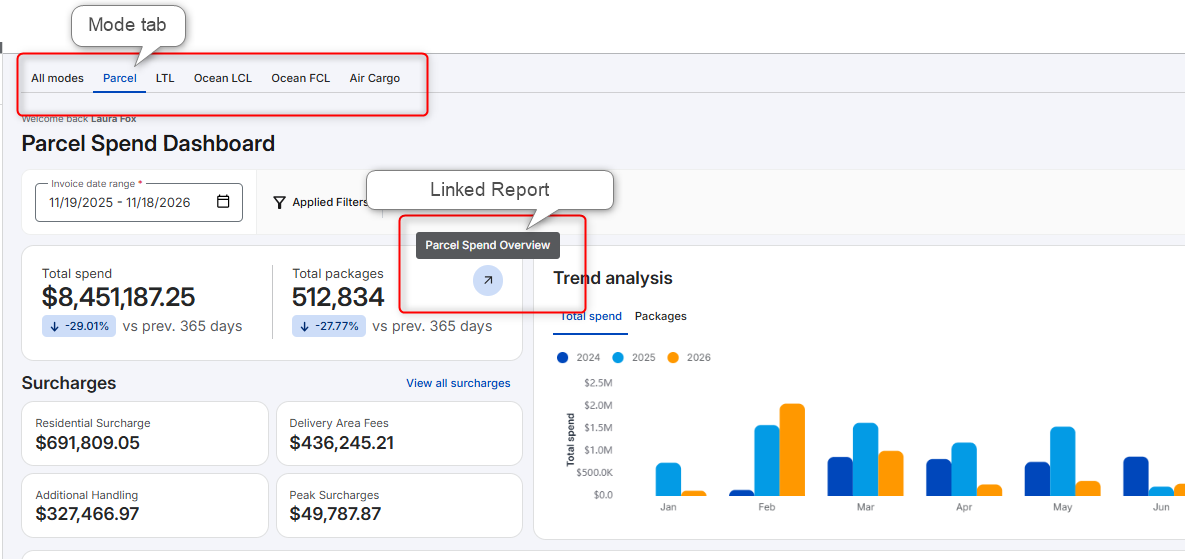
The following tables list linked reports by the mode.
All Modes tab
On the All Modes tab, tiles link to the following reports:
|
Tile(s) |
Linked Report |
|---|---|
Total spend, Shipments, Category by spend, Mode by spend
|
Spend Overview, on All modes |
Surcharges group heading
|
Surcharge Analysis, on All modes |
A surcharge card
|
Surcharge Analysis, filtered to that card's mode |
Parcel
On the Parcel tab, tiles link to the following reports:
|
Tile(s) |
Linked Report |
|---|---|
Total spend, Total packages, Fuel Surcharges, Average cost per pound
|
Parcel Spend Overview (unchanged) |
Average cost per package
|
Package Characteristics |
Average zone
|
Account Management |
Surcharges group
|
Accessorial Analysis, now called Surcharge Analysis |
Service Overview (whole chart, or one service type)
|
Parcel Spend Overview, filtered to the service type when one is selected |
Shipping or Receiving locations map (a state)
|
Senders Receivers, filtered to that sender or receiver state |
LTL
On the LTL tab, tiles link to the following reports:
|
Tile(s) |
Linked Report |
|---|---|
Total spend, Shipments, Line haul amount, Fuel surcharge
|
Spend Overview, filtered to LTL |
Accessorial amount, surcharge cards
|
Surcharge Analysis, filtered to LTL |
Cost per shipment
|
Shipment Characteristics, filtered to LTL |
Average rated class
|
Freight Class Analysis |
Average distance
|
Mileage Analysis, filtered to LTL |
FTL
On the FTL tab, tiles link to the following reports:
|
Tile(s) |
Linked Report |
|---|---|
Total spend, Shipments, Transportation amount, Fuel surcharge
|
Spend Overview, filtered to FTL |
Accessorial amount, surcharge cards
|
Surcharge Analysis, filtered to FTL |
Cost per pound, Cost per shipment
|
Shipment Characteristics, filtered to FTL |
Average distance
|
Mileage Analysis, filtered to FTL |
Top shipping lanes
|
Shipping Lane Analysis, filtered to FTL |
Ocean LCL and Ocean FCL
Each Ocean tab links to the same reports, filtered to its own mode:
|
Tile(s) |
Linked Report |
|---|---|
Total spend, Shipments, Transportation amount, Fuel surcharge
|
Spend Overview, filtered to that mode |
Accessorial amount, surcharge cards
|
Surcharge Analysis, filtered to that mode |
Average volume, Cost per CBM, Cost per shipment
|
Shipment Characteristics, filtered to that mode |
Top shipping lanes
|
Shipping Lane Analysis, filtered to that mode |
Air Cargo
On the Air Cargo tab, tiles link to the following reports:
|
Tile(s) |
Linked Report |
|---|---|
Total spend, Shipments, Transportation amount, Fuel surcharge
|
Spend Overview, filtered to Air Cargo |
Accessorial amount, surcharge cards
|
Surcharge Analysis, filtered to Air Cargo |
Average weight, Cost per kg, Cost per shipment
|
Shipment Characteristics, filtered to Air Cargo |
Top shipping lanes
|
Shipping Lane Analysis, filtered to Air Cargo |